

“Front-Load, Fail Fast, Dive Deep.” This was The Blueprint. It is safe to say that by now—We have loaded. We have failed. And, we have, on occasion, solved. So now — we go Deep.
This is the post where the hood comes off. #nerdalert
Last session, the plumbing was confirmed — Python was talking to Ollama, Mistral was responding, and the model was running locally. Now the question was if I could make it actually intelligent?
The idea was elegantly simple — When I ask a question, the assistant should consult the actual IRS documents, extract the relevant passage, and compose an answer grounded in the source material. Retrieval-Augmented Generation — RAG, in the parlance — was precisely the architecture for this. I asked my coding assistant to build it, with what I can only describe as considerable anticipation.
Sidebar: What is Retrieval-Augmented Generation (RAG)? RAG means combining AI with a smart search of documents. Instead of guessing, the AI looks up the exact info it needs — like having Google built into your assistant.
To test it, I asked what files I should download and it gave me a list. So I did that. It created a data folder containing standard deduction tables, tax bracket PDFs, child tax credit documents — all real IRS reference files stored locally on my machine. It updated the scripts to load both text and PDF files.
Making it smart
It said I had done what I wanted to do.
What AI told me:
Result: Your assistant now references actual
IRS data when answering questions.
Question: What is the standard deduction for married filing jointly in 2024? Answer: According to IRS 2024 data, the standard deduction for married filing jointly is $29,200.
Current Status: Local model (Mistral via Ollama) runs successfully. Python virtual environment configured. Real IRS data integrated for grounded responses. End-to-end workflow verified locally.
Quite. One does wonder what "done" means to a machine that hasn't actually been asked the question yet.
I asked it and it gave me a disclaimer.
After a bit of wrangling around with questions and reviewing the code (I made it do it) — I learned two things.
THING ONE, LLMs can read text, but unstructured PDFs introduce noise — headers, footnotes, and line breaks confuse the model.
THING TWO, giving the entire IRS document as context is too much; the model struggles to pick out the relevant info.
Reading the whole library
Once we figured this out, and I asked it to solve the problem, the solution had three parts.
Preprocessing the PDFs to clean up formatting and remove extraneous text.
Implementing chunked, keyword-based retrieval — feeding the model only the relevant sections. And
Iterating on prompt design to ensure it answers only from the context provided.
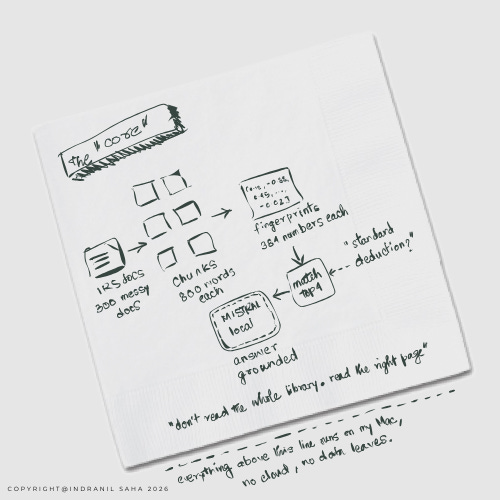
The chunking part deserves a minute of it’s own. I remember it as this: Publication 17 is 300 pages. I asked about the standard deduction. The model was reading all 300 pages every time — headers, footnotes, examples about farming income, everything. Chunking breaks it into 800-word pieces with 150-word overlaps. When I ask about the standard deduction, the system finds the four most relevant chunks out of hundreds, and gives the model only those. It went from reading the whole library to reading the right page.
Given a user query — say, “standard deduction 2024 married filing jointly” — we compute an embedding (a numerical fingerprint of the question’s meaning) and do cosine similarity against all the chunk vectors. The top matches go to the model. Not the whole library. Just the right pages.
Crashing into the real thing
This was pretty cool for me. Because, one of the many reasons I started this project, some of which I listed here (others I didn’t and this is one of them), was I was tired of reading about these cool things and wanted to test out their real efficacy in real world scenarios and figure what would be some challenges (because nothing that sounds that cool can be really without its own set of challenges, we don’t live in that kind of a world, right?)
This unpacked the challenges for me and gave me a hands-on experience to see some real underlying tech — vectors, quantizations, temperature, transformer architecture, embeddings — all things I had only theoretically read about and maybe built some tiny tests in a lab environment. Now I was hitting them in the wild, coming at them not in a planned way but just crashing into them and learning while doing something else entirely different. Learning not for learning but for getting something real out of it.
I am creating a list for all the terms I encounter along the way — see The Lexicon [link].
What's happening under the hood
Here is what’s happening under the hood. How SentenceTransformer generates embeddings, how NumPy stores them efficiently, and how both fit together in the RAG pipeline.
Each chunk of IRS text goes through the same process: tokenization breaks the words into IDs, a transformer encoder (12 layers of attention) learns which words relate to which, mean pooling averages everything into a fixed-size vector, and the output is a 384-dimensional embedding — a numerical fingerprint that captures what the chunk means. The model is called all-MiniLM-L6-v2, it’s lightweight, and it runs entirely locally.
DIAGRAM 1: How a chunk becomes a fingerprint — the embedding process.
![A vertical flow diagram showing the embedding process in the AI tax assistant. An 800-word IRS text chunk is tokenized into word IDs, processed through a 12-layer transformer encoder (model: all-MiniLM-L6-v2, running locally), averaged through mean pooling into a fixed-size vector, and output as a 384-dimensional embedding vector. Annotations on the right show examples at each stage: "standard" becomes token [3547], "deduction" becomes [2890, 41].](https://substackcdn.com/image/fetch/$s_!YrZI!,f_auto,q_auto:good,fl_progressive:steep/https%3A%2F%2Fsubstack-post-media.s3.amazonaws.com%2Fpublic%2Fimages%2F478a8991-4166-4c15-8eed-5519911905de_1440x1020.png "A vertical flow diagram showing the embedding process in the AI tax assistant. An 800-word IRS text chunk is tokenized into word IDs, processed through a 12-layer transformer encoder (model: all-MiniLM-L6-v2, running locally), averaged through mean pooling into a fixed-size vector, and output as a 384-dimensional embedding vector. Annotations on the right show examples at each stage: \"standard\" becomes token [3547], \"deduction\" becomes [2890, 41].")
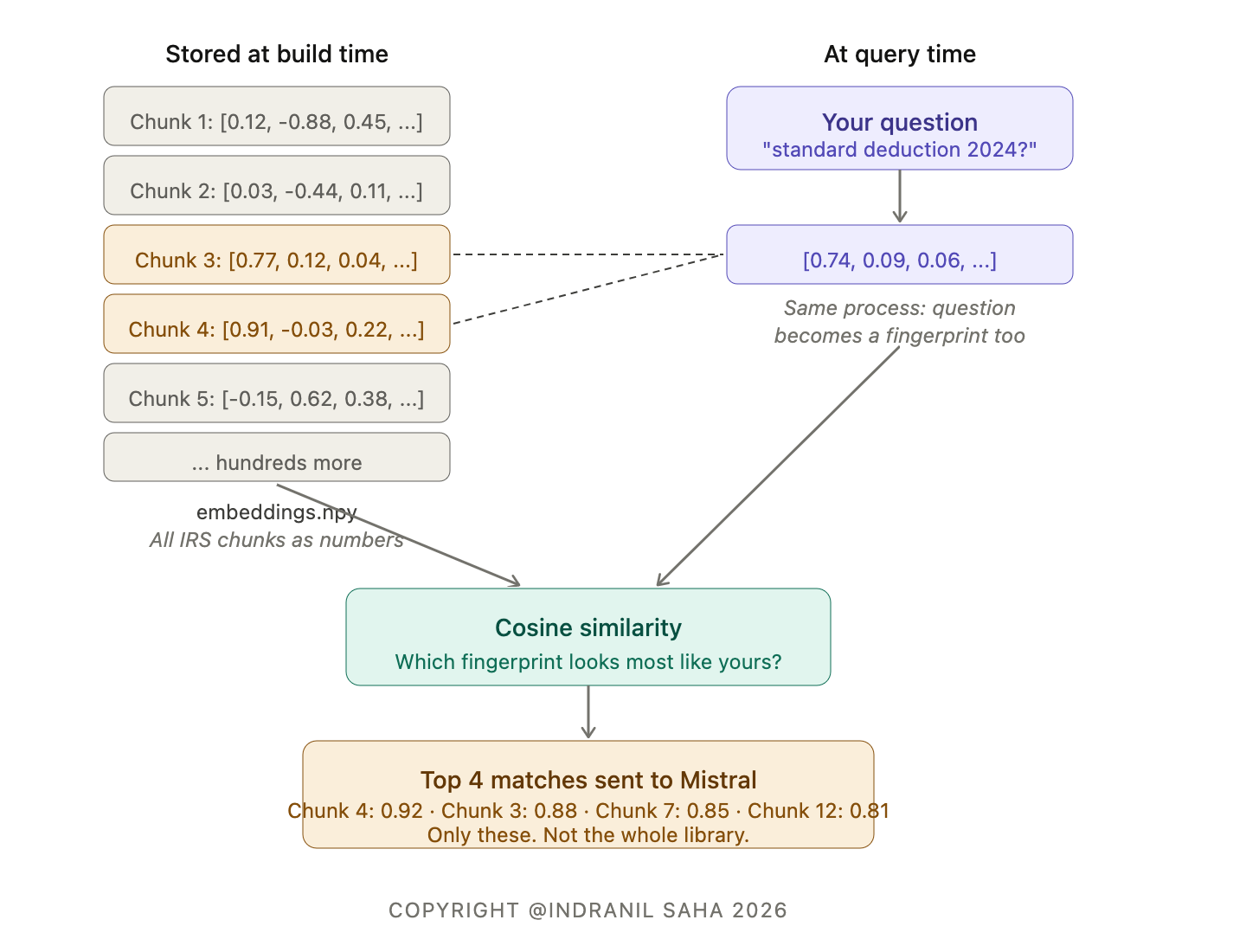
All those chunk fingerprints get stacked into a matrix — hundreds of 384-number vectors stored in a single file called embeddings.npy. When a question comes in, it gets the same fingerprint treatment. Then cosine similarity compares the question’s fingerprint against every chunk’s fingerprint and ranks them. The top four matches — with similarity scores like 0.92, 0.88, 0.85, 0.81 — go to Mistral. Only those. Not the whole library.
DIAGRAM 2: How retrieval finds the right chunks — the matching process.
The magnifying glass
I also learnt modern debugging while doing this. I had no idea how to debug in this context [mine went back to the days of C, C++, Java], but I told the AI that I needed to see what was happening inside the pipeline — and it built what I can only describe as a magnifying glass for the code.
Debug mode doesn’t change the logic of the assistant. It just prints extra information that helps you understand what’s happening under the hood. On the retrieval side, it prints the query, shows the similarity scores of the top chunks, and alerts if all chunks are too short or got filtered out. On the Ollama side, it captures warnings and errors and prints them if the model times out or fails.
I used it to catch mistakes early — if retrieval returns irrelevant chunks, I could see why. Low similarity, filtered due to length, wrong document being searched. I used it to understand model behavior — knowing which chunks the model is actually reading is crucial for a private tax assistant, because I don’t want it to hallucinate. Debugging confirms the response is grounded in IRS text. And I used it to optimize the pipeline — seeing how many chunks pass filtering, detecting whether the chunk size or overlap needs adjustment.
Me — the vision and the hustle. AI — the expertise and the straight and narrow.
What started as a basic keyword search — search every file in the data folder, match keywords in the question, return the first 2,000 characters of any matching file — became a full embedding-based retrieval system. PDF cleaning to remove headers, page numbers, and spacing. Text chunking with overlap to preserve meaning. SentenceTransformer embeddings creating high-dimensional semantic vectors. Vector similarity search using cosine similarity to retrieve only the most relevant chunks. Top-k retrieval with debug mode so I can see which chunks are selected and why. Context-restricted prompting explicitly telling Mistral to answer only from retrieved IRS text. And a CLI chat interface with debug toggling and error handling.
Damn it, real life
But even after all of that, the answers were incorrect. At that point, I was feeling quite deflated, the initial euphoria of implementing cool things and seeing it work in practice had ebbed considerably. At that point, my instinct was “how do I make this thing work”? I think this was a moment of self-awareness for me: in spite of all the philosophizing about learning, and that the journey mattered more than the destination, and that there is only winning and learning, here I was getting taut inside when the thing I wanted to work (and the thing that AI said should work) was not working in real life. It taught me how much of my Type 1-ness I try to hide, how outcome oriented I am inside, and how much it is “0” or “1” for me! Damn it, real life!
But when that realization dawns, that’s when you take a breath, and you tell your inner engineer to start kicking into action, and you tell yourself “stay with it old boy, if you stay with the problem, get real close, it’s got to break down, and you’re going to find the bloody solution.” And so I pushed. AI told me to improve chunk quality — increase overlap, detect and merge broken sentences. Add metadata like tax year, form type, section so Mistral understands which year or which form applies. Add quality checks for hallucinations and for answers not found in context.
The disclaimer problem
When the model kept giving me disclaimers. “Consult a tax professional.” “This information may not be current.” I had explicitly told it not to do that. So I escalated:
First attempt: basic question, no constraints. Disclaimer.
Second attempt: “Answer only from the context provided.” Still hedges.
Final version: “You MUST answer only using the provided IRS context. If the answer is not in the context, say: ‘Not found in provided IRS documents.’ Do NOT add generic IRS disclaimers. Do NOT guess.” Finally works. The strict constraint eliminates hallucinations and generic disclaimers.
One-way door
And while I was at it, I kinda forgot my own rule of only building MVP because I was tired of downloading tax documents manually. So, I built a code to have my system open up a line to the external world and download latest IRS documents from designated safe sites. One way only. No data going out of my system. Or so I understand — my expert friends can tell me if I got it wrong. Once again, AI would not tell me to do it, it kept asking me to barcode things, write things in a test file, to test scenarios, and when I asked it to build this code, one could almost sense a hesitation — as though the machine understood I was asking it to compromise a principle. And then, when I explained the one-way logic, something rather like relief. I do tend to attribute feelings to things that have none. An occupational hazard, I’m told.
Anyway, there it is — these things have been built, and things are a lot better now, like I said in my previous LinkedIn post [here].
Graduation
Oh and by the way, like we said (and was drilled in quite hard by our well-wishers, i.e., Anubhav Atrish [here]), free did not cut it any longer, and so I have paid my dues and I have a Claude subscription now. Anubhav, we have graduated, old boy!
It’s REALLY slow, you need patience, BUT it is working like it should, and without much hard coding.
Next up: Need to fine tune and make the munchkin (Mistral) gear up. Then need to get the system to generate a completed, ready-to-file tax form (just plain vanilla). Then we need to go on overdrive… We have a few more steps I think…
This is Part 6 of an ongoing series on building a private, local AI tax assistant — one hour a week (although I am not sure if this is true anymore - this post took about 6 hours to write), on consumer hardware, without sending financial data anywhere.
Part 1: Building a Private AI Tax Assistant: In public, on a MacBook!
Part 2: The Infrastructure Tax
Part 4: It Actually Works. Kinda.
Part 5: The Counterintuitive Decision
If you’re building something similar or have any questions/ideas to share, I’d love to hear from you. Cheers!
I. Thinking on strategy, innovation, and philosophy — for people who think seriously about how to build things and make decisions.